














How We Select Google Pay Casinos
Before writing any of our reviews on casino payment methods, we conduct thorough tests to provide our readers with accurate information. We’ve rejected 9 partnership deals with online casinos offering higher commissions, requesting that we hide their limitations. Here is how we select our casinos that accept Google Pay.
- Google Pay Integration Verification: We confirm if the autofill system works across different Android 7.0+ devices, including Google Pixel, Samsung Galaxy, and OnePlus, as claimed.
- Autofill vs Direct Payment Distinction: We outline the 95% of the best Google Pay casinos that allow card autofill and those that enable direct payments from the Google account balance.
- Biometric Authentication Testing: We verify whether casinos allow biometric authentication, such as fingerprints and face recognition, to approve Android payments. We measure authentication speed and determine whether players can use a PIN as a backup.
- Linked Card Acceptance: We document the types of cards (MasterCard, Visa, and American Express) that successfully process payments via Google Wallet.
- Bank Blocking Analysis: We identify financial institutions that do not allow autofill at casinos that accept Google Pay and find alternatives that work with Wells Fargo, Chase, and Bank of America.
- Transaction Speed Measurement: We compare the time it takes Google Pay to autofill deposits to manual card entry. We also compare the speed to that of other payment options, such as Apple Pay.
Compare the Best Google Pay Casinos for 2026
| # | Top Google Pay Casinos | Welcome Bonus | Minimum Deposit | Max. Cash Out | Payout Time | Our Rating |
|---|---|---|---|---|---|---|
| 1 |  BaxterBet Casino BaxterBet Casino | 100% UP TO €500 + 50 FREE SPINS NO DEPOSIT | €10 | €10000 | 2-3 days | |
| 2 |  HellSpin Casino HellSpin Casino | 100% UP TO €100 + 100 FREE SPINS | €10 | €50000 | 3 days | |
| 3 |  SpinWinera Casino SpinWinera Casino | 100% UP TO €1500 + 100 FREE SPINS NO DEPOSIT | €20 | €100000 | 2-3 days | |
| 4 |  MyStake Casino MyStake Casino | 150% UP TO $/€750 | $/€20 | $/€15000 | 3 days | |
| 5 |  Europa777 Europa777 | 200% UP TO €1000 + 100 FREE SPINS | €10 | €30000 | 1 day | |
| 6 |  BetFury Casino BetFury Casino | 200% UP TO $/€500 | $/€30 | $/€50000 | 1-2 days | |
| 7 |  Wolfy Casino Wolfy Casino | 100% UP TO €300 + 100 FREE SPINS | €20 | €10000 | 2 days | |
| 8 |  WinWin Bet Casino WinWin Bet Casino | 100% UP TO $/€600 + 100 FREE SPINS | $/€1 | $/€100000 | +3 days | |
| 9 |  MoroSpin Casino MoroSpin Casino | 100% UP TO €500 + 150 FREE SPINS | €20 | €10000 | 1-2 days | |
| 10 |  Donbet Casino Donbet Casino | 150% UP TO €750 + 50 FREE SPINS | €10 | €15000 | 3 days |
BaxterBet Casino Review
100% UP TO €500 + 50 FREE SPINS NO DEPOSIT
Code:EXTG50 Copied - 4,251 slots and 394 live games from 74 providers
- 24/7 live chat and fast responses (1-5 minutes)
- 25 payment methods including 7 cryptocurrencies
Casino Details
User reviews
FAQ
Is BaxterBet Casino licensed and safe to play?
BaxterBet Casino was launched in 2025 and operates under EnigmixLight Interactive Services Ltd. The casino offers 8 responsible gaming options and SSL encryption. However, our review uncovered restrictive terms and conditions, giving the platform a 6.4/10 legit & fairness rating. Before depositing, we highly recommend that you review country restrictions and withdrawal policies.
What games can I play at BaxterBet Casino?
BaxterBet Casino has 4,251 slot games, along with 394 live dealer games from 74 software providers. This extensive game library includes roulette, baccarat, blackjack, jackpots, video poker, and also specialty games, such as keno and bingo. However, the platform doesn’t offer mobile apps.
How long do withdrawals take at BaxterBet Casino?
BaxterBet Casino advertises 2-3 day payout periods, but in reality, the processing time is 4 days on average, according to our tests. The minimum withdrawal goes from €50 to €120, depending on your country and payment methods. Not to mention, you need to wager deposits at least 3 times before you request withdrawals, regardless of bonus play.
What payment methods does BaxterBet Casino accept?
BaxterBet Casino supports 25 payment methods, including Visa, Mastercard, Apple Pay, Google Pay, Skills, and bank transfers from major European banks. It also accepts the following cryptocurrencies: Bitcoin, Ethereum, USDT, Litecoin, USD, Dogecoin, and Tron. The lowest deposit allowed is €10, and the maximum cashout is €10,000.
What countries are restricted at BaxterBet Casino?
BaxterBet Casino restricts players from over 70 countries, including USA, UK, France, Netherlands, Spain, Ukraine, Russia, and all FATF blacklist/greylist nations. Some home providers have additional restrictions. For instance, NetEnt jackpot wins are voided for players from 17 specific countries (even if they can play the games)
Gallery


HellSpin Casino Review
100% UP TO €100 + 100 FREE SPINS
Code: Not required- 8500 slots and 836 live dealer games
- $/€10 minimum deposit
- Support 24/7 through live chat
- 18 traditional banking options and 21 cryptos
HellSpin Casino holds a Costa Rica license and its parent company is Chestoption SRL. The Costa Rican license brings a certain degree of legal oversight, but it’s not as robust as MGA or UKGC licenses. However, their terms and conditions are transparent. The casino has 9 responsible gaming tools, such as self-limits, self-exclusion, game history, financial activity monitor and minor-restrictive tools, among many others.
Casino Details
User reviews
FAQ
What's the minimum deposit for Hellspin Casino?
The minimum deposit for playing in Hellspin Casino is €10. It’s standard and accesible for casual players.
How many games does Hellspin Casino offer?
Hellspin Casino has 8,500 slots and 836 live dealer games from over 50 top providers; among them, Microgaming, NetEnt and Pragmatic Play.
How much can you cash out from Hellspin Casino?
The maximum you can withdraw from Hellspin Casino is €50,000. This limit is generous compared to other casinos that let you withdraw between €5,000 and €10,000.
Gallery

SpinWinera Casino Review
100% UP TO €1500 + 100 FREE SPINS NO DEPOSIT
Code:EXTREM100 Copied - Vast game selection (6,500 slots and 450+ live games)
- Fast KYC verification (1 day)
- 6 cryptocurrencies available (BTC, ETH, LTC, XRP, USDT, TRX)
- 20 languages and 6 fiat currencies
Casino Details
User reviews
FAQ
Is SpinWinera Casino licensed and regulated?
SpinWinera Casino operates under a Costa Rica license issued to Bitosa Dynamics Ltd. Costa Rica is an unregulated jurisdiction with no player protection mechanisms or dispute resolution processes.
What are the withdrawal limits at SpinWinera Casino?
SpinWinera Casino has withdrawal limits of €1,000 per day, €3,000 per week, and €10,000 per month. You can increase these limits by getting level 16 in the VIP program.
How long does verification take at SpinWinera Casino?
At SpinWinera Casino KYC verification is completed within 1 day, using a third-party tool that requires ID documents and a selfie. Keep in mind that you need to verify your account before you request a withdrawal.
Does SpinWinera Casino offer live chat support?
No, SpinWinera Casino doesn’t offer live chat support. You can contact support via email, with responses typically provided within 24 hours.
Which games contribute to wagering requirements at SpinWinera Casino?
At SpinWinera Casino, only slots contribute 100% toward wagering requirements. All the other game categories, including roulette, live casino, blackjack, baccarat, and table games contribute 0%.
What cryptocurrencies does SpinWinera Casino accept?
SpinWinera Casino accepts 6 cryptocurrencies, including Bitcoin (BTC), Ethereum (ETH), Litecoin (LTC), Ripple (XRP), Tether (USDT), and Tron (TRX) for deposits and withdrawals.
How fast are withdrawals processed at SpinWinera Casino?
SpinWinera Casino processes your withdrawals in 2-3 days for fiat methods. However, crypto withdrawals are usually completed within minutes after verification is complete.
Gallery

Hard Truth About Google Pay Casino Deposits
In line with Google’s Terms of Service §4.7: Google Pay may not be used for gambling, gaming, or lottery purchases, Google prohibits using the Google Pay balance for direct gambling payments. This is further supported by Google’s official updated policy from March 2024, which states that Merchants in restricted categories, including gambling, must not accept Google Pay as a payment method.
No direct payments
As a result, top Google Pay online casinos do not allow direct payments from a Google account balance or Google Pay funds. They only enable autofilling of card details saved on the Google Wallet. While many casino operators market Google Pay accepted to attract Android users, it’s merely using a standard Visa or MasterCard to make payments with Google Pay acting as an intermediary to help autofill the card details.
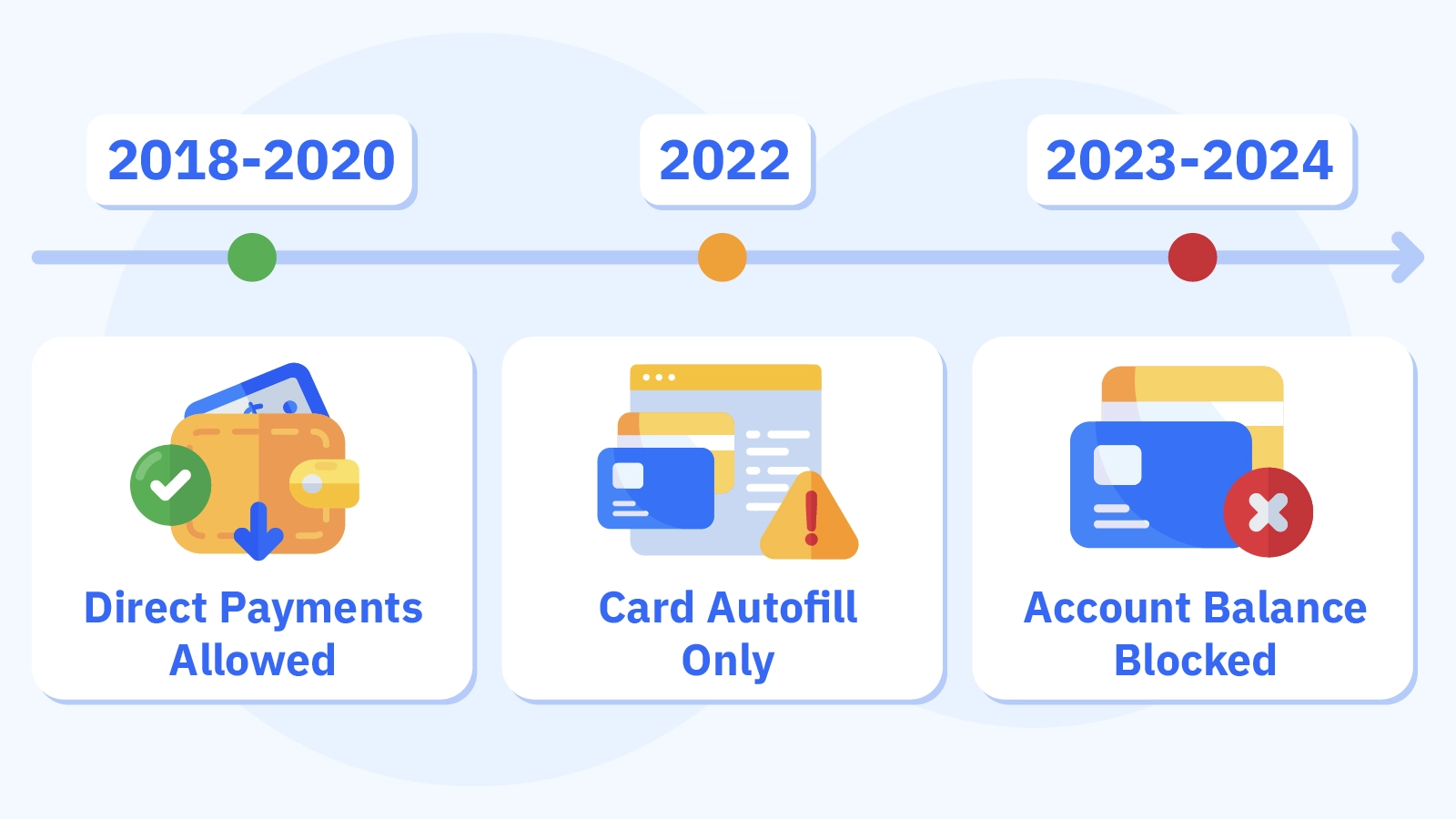
Before now (2018-2020), UK online casinos accepted direct gambling payments via Google Pay. Due to regulatory pressure, Google Pay casinos were restricted to card autofilling from 2020 to 2022. Since 2023, direct Google account payments at gambling sites have been halted globally, and platforms are only allowed to use the autofill feature.
No Google Pay autofill
However, not all banks allow secure Android payments via Google Pay to autofill card details due to their gambling restrictions. For instance, Chase often blocks cards from making deposits at casinos, so Google Pay autofill is likely to fail.
Additionally, Google Pay card autofill only works on Android devices, and only Android users can use it. It doesn’t work on iOS devices, so iPhone users are strictly ineligible at casinos that accept Google Pay. However, Apple Pay via iPhones is more common across online casinos than Google Pay. They’re usually integrated 12-18 months earlier than Google Pay due to easier integration of Face ID and Touch ID, and a single API across Apple devices.
How Google Pay Autofill Actually Works at Casinos
Like with Apple Pay casino deposits, using autofill at casinos that accept Google Pay is straightforward. Follow the steps below to make instant Google deposits.
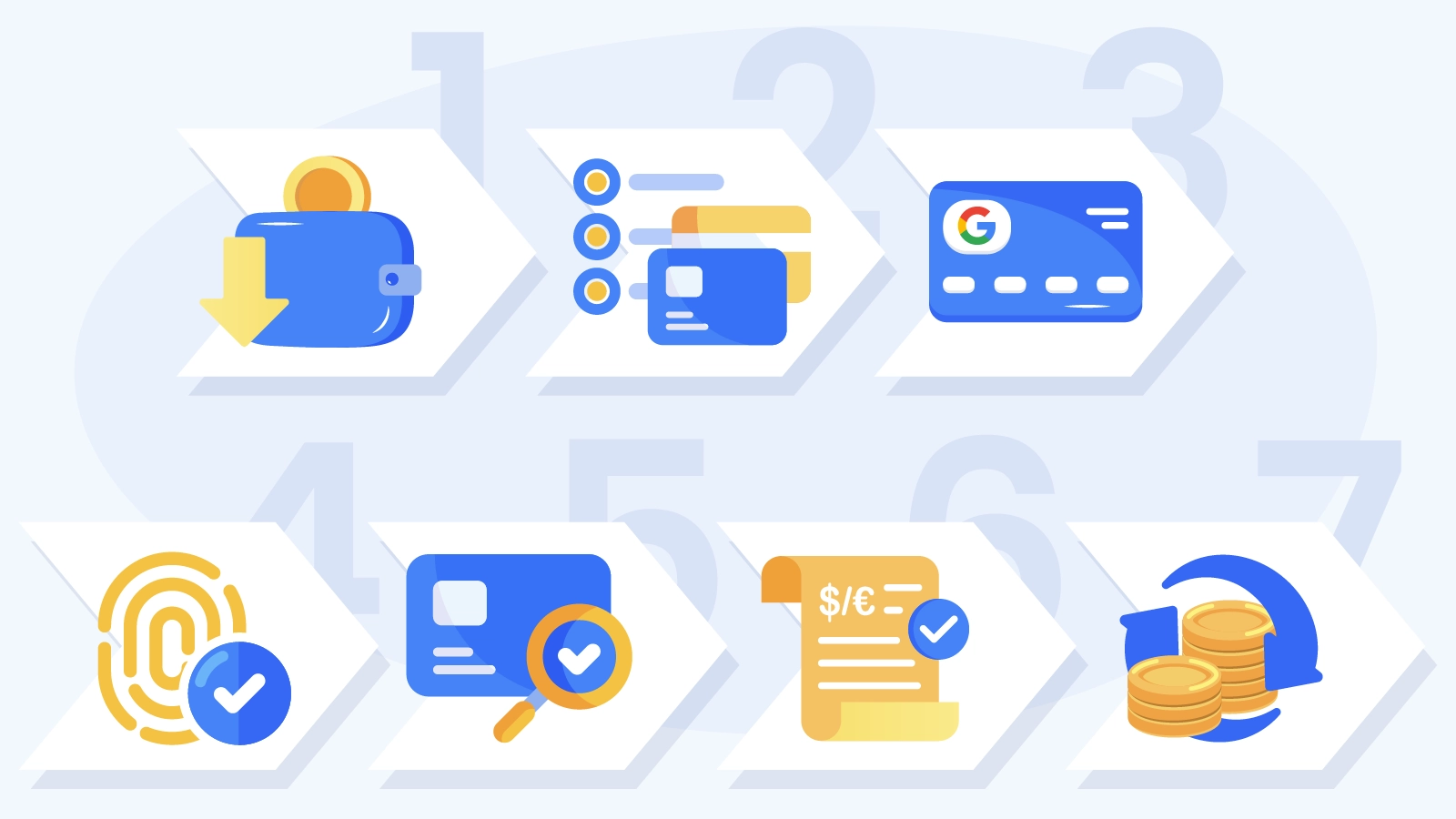
- Go to the casino’s cashier on your Android device and input your deposit amount ranging from $/€10-$/€10,000.
- Choose Google Pay as your preferred payment option.
- The Google Pay overlay will appear immediately, showing your saved cards in your Google Wallet or account.
- Select one of the linked cards and authenticate using your fingerprint, face, or PIN.
- Google Pay will autofill your card number, expiration date, and CVV.
- You just need to confirm the payment, and the Google Pay casinos will process it as a standard card transaction.
- The money will be reflected in your casino account within 5 minutes. It may sometimes be instant, depending on your card processor.
This process is the same as entering the card details manually, but faster because Google Pay autofills them. Your Google Pay balance or Google account funds are not debited. Transactions are debited directly from your selected card. Google Pay only serves as encrypted card storage, producing the linked cards to complete your one-click deposit.
Additionally, biometric authentication is required to prevent unauthorized access. It’s your phone’s way of verifying you’re behind the phone, not a third party. If fingerprint payment fails, you’ll be required to input your PIN.
Setting Up Google Pay for Casino Deposits
The first step to making deposits at top Google Pay casinos is to add your card to your Google ecosystem. You may either add it to your Google wallet or through Payments & Subscription in your Google account settings by following these steps.
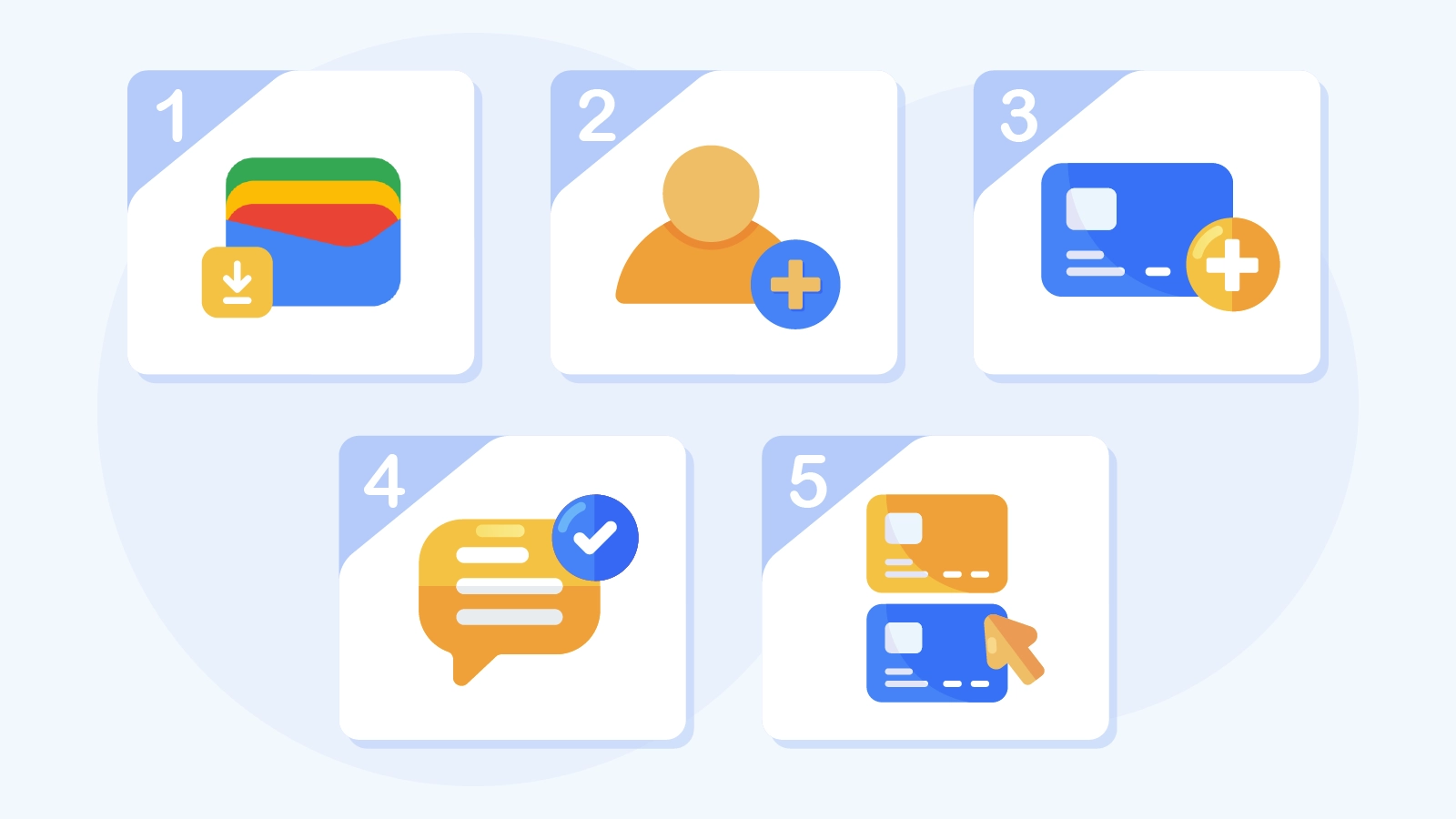
- Download the Google Wallet app for free from the Google Play Store. Your device must run Android 7.0 or higher to install the app.
- Sign in to the app using your existing Google account.
- Tap + to add a secure Android payment card. You’ll need to input your card details and input the verification code sent by your bank via SMS or email.
- If you have multiple cards linked, set your preferred one as the default card for payments.
- Go to security in your phone’s settings to enable biometric authentication, such as fingerprint or face unlock. This is recommended because it’s faster than using PIN codes.
Please note that some bank cards restrict gambling deposits. Therefore, you can contact your bank before making your Google Pay casino deposit to pre-authorize gambling transactions. Alternatively, switch to Chime, Ally, and Capital One, which allow gambling-related deposits.
Before linking your card to Google Pay, test it at best online casinos by making a $/€10 deposit to confirm that the card processes gambling transactions, then set up autofill. Sometimes, it’s best to link prepaid Visa/MasterCard such as Vanilla, Netspend, and Green Dot to Google Pay, as they rarely restrict casino mobile NFC payments. You may also set up a secondary Google account for gambling-related activities only to prevent mixing casino payments with other transactions.
Bank Blocking & Workaround Strategies at Google Pay Casinos
Checking if your bank allows Google Pay casino autofill is key before adding their card to your wallet. For instance, you may be blocked from trying to make a /$50 deposit via Chase Visa at online casinos that accept Google Pay, only to use the same card to complete an Amazon purchase 5 minutes later.
Here are some examples of financial institutions that often block Google Pay casino autofill.
- High-Block Banks: With a 40-60% decline rate, Bank of America, Chase, and Wells Fargo are at the top of the chart.
- Medium-Block Banks: Based on transaction patterns, banks such as Capital One, PNC, and TD Bank have a 15-25% decline rate.
- Low-Block Banks: These banks have gambling-friendly policies with a 5-10% decline rate. Options include Navy Federal Credit Union, Ally Bank, Chime, and Discover.
Please note that some bank cards may initially allow Google Pay casino transactions, only to decline them later. For instance, after using your Bank of America MasterCard to fund top Google Pay online casinos 3 times with $/€25 each, your 4th deposit is declined and flagged for bank fraud triggered by gambling patterns. You may re-enable this transaction after undergoing phone verification.
Consider alternatives
To avoid issues with bank cards, prepaid cards are an alternative option. Purchase a prepaid Visa card of around $/€20-500, link it to your Google Pay, and use it to make casino deposits. This has a 95% success rate, with minimal risk of blocked transactions. Alternatively, credit unions offer approval rates of over 90% at online casinos that accept Google Pay. You can switch to a local credit union with no gambling restrictions.
We recommend first reaching out to your bank for pre-approval to make casino deposits. It’s also best to link 2-3 different cards to your Google Pay account so you have options to complete payments at mobile casino sites even if one is blocked.
Google Pay vs Apple Pay vs Manual Card Entry Speed
One advantage of joining top Google Pay casinos is the speed of one-click deposits. However, while Google Pay autofills take 3-8 seconds in total, it’s 25-30% slower than Apple Pay contactless deposit speed at 2-6 seconds. This is because tap to pay via Apple Pay takes just 1 second to approve with Face ID.
- Nevertheless, it is 5-8 times faster to use Google Pay than to manually enter your card. Manual card entry takes about 25-40 seconds to complete. You’ll need to input your card details and billing address in the Android casino apps, taking around 20-35 seconds per deposit, compared to Google Pay transactions.
- Some browsers may work like Google Pay by saving your card details and autofilling them. While the process is similar, Google Pay is slightly faster by 2-5 seconds due to biometrics. You’ll need to enter your password using saved browser autofill.
Note
When you make 10 deposits for each method, Google Pay averages 5.2 seconds, while Apple Pay averages 3.8 seconds, which is 1.2-1.5x faster than Google Pay. On the other hand, manual card entry takes an average of 31.5 seconds. By making 5 or more instant Google deposits per week, you’ll save approximately 2-3 minutes per week. This totals 100-150 minutes annually.
Troubleshooting Google Pay Casino Errors
You may sometimes face certain challenges when making payments at the best Google Pay casinos to play or claim top casino bonuses. Here is how to troubleshoot some common errors.
- Payment Method not Supported: Accounting for 30% of errors, this means the casino doesn’t support autofill. You need to enter your card manually to make Visa casino deposits or opt for other Google Pay online casinos instead.
- Transaction Declined: This error accounts for 40% of the possible issues you may face. It happens when banks block your Android payments. You may need to link a prepaid card to Google Pay or contact your bank to authorize your gambling transactions.
- Authentication Failed: Accounting for 15% of errors, this issue occurs when your biometric sensor fails to work properly. You need to clean the fingerprint sensor or re-register your fingerprint. If it doesn’t work, use PIN instead.
- Google Pay not Available: Your phone must be running Android OS 7.0 or higher to use Google Pay. This error, which accounts for 10% of the issues you might face, occurs when your phone is outdated. Once you upgrade or change your phone, update your Google Wallet as well.
- Card Verification Required: Accounting for 5% or errors, you may be asked to reverify your card, especially if it has expired. Go to your Google Pay wallet to add a new card to complete verification again.
- Deposit Limit Errors: If the casino imposes a daily or weekly cap on Google Pay transactions, you need to wait for the cap to reset. Alternatively, contact customer support to increase your limits.
- Internet Connection Failures: You need a strong enough internet connection to use Google Pay. If your network is unreliable, move to a stronger signal area or switch to Wi-Fi before retrying secure Android payments.